Partner Integration Guide
Put a cost segregation assistant on your website in under an hour
Give your clients a way to ask about cost segregation without leaving your site. Choose a co-branded page you link to, or a chat widget you embed directly — either way, every lead is tagged with your referral code automatically.
Not a partner yet? Talk to us about becoming a partner
Which option should you choose?
| Option 1 — Link | Option 2 — Widget | |
|---|---|---|
| Effort on your site | Paste a link, no code | Paste one script tag |
| Where it lives | A page on clickdragfinance.com | Directly in your site (as an iframe) |
| Branding | Fully co-branded — your header, logo, colors, fonts | Launcher color/label match your site; panel is ClickDrag-branded |
| Best for | A dedicated landing page or nav item | Keeping visitors on your site while they chat |
| Referral tracking | Automatic via the page URL | Automatic via data-partner |
| Time to go live | Minutes | Minutes |
Option 1
Link to your co-branded page
We host a page at clickdragfinance.com/partners/<your-code> with your header, logo, colors and fonts, a cost segregation explainer, and the chat inline. You add one link on your site. Zero code.
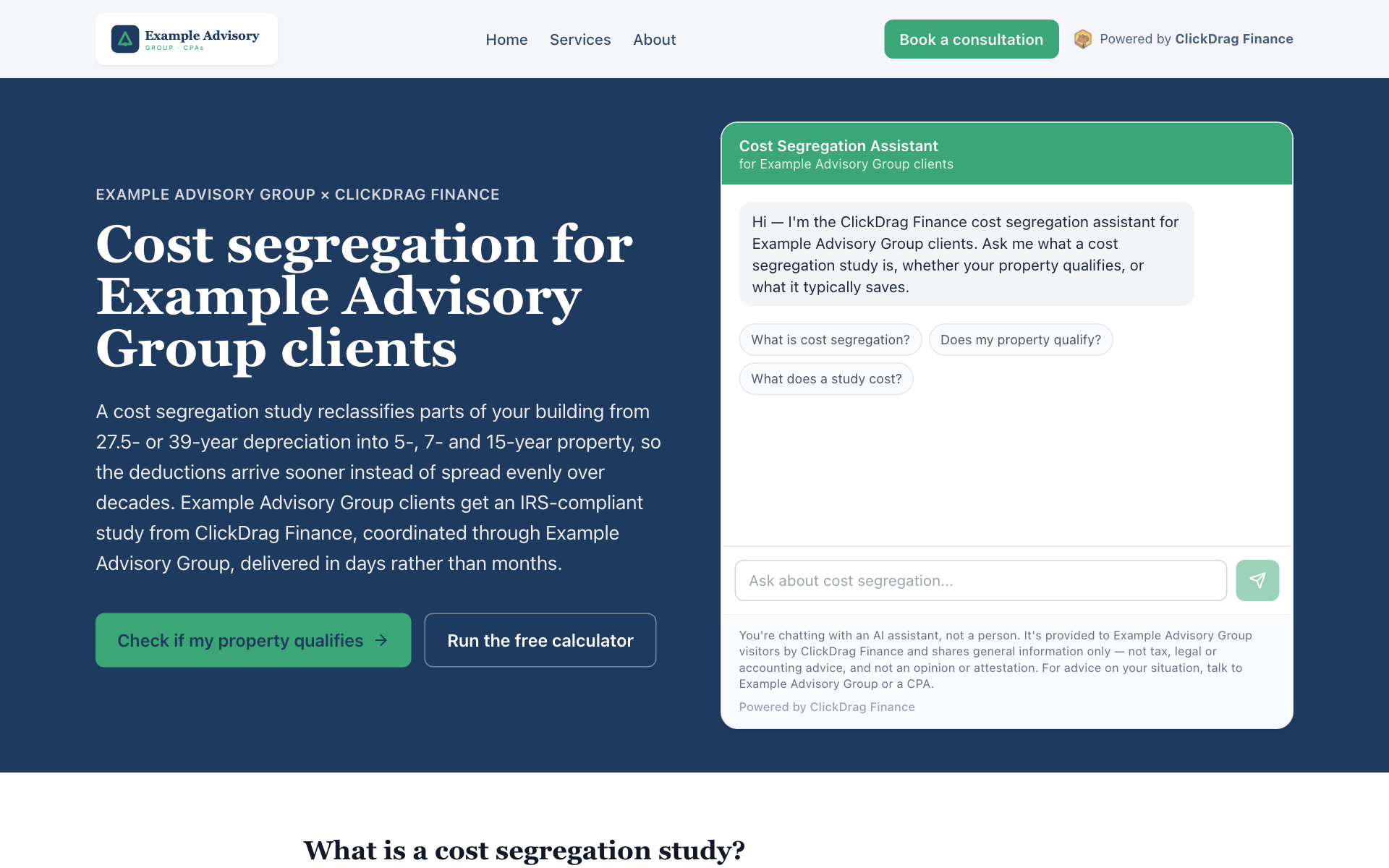
What you paste
<a href="https://www.clickdragfinance.com/partners/YOUR-CODE">Cost Segregation</a><a href="https://www.clickdragfinance.com/partners/YOUR-CODE"
style="display:inline-block;padding:10px 20px;background:#0f2650;color:#fff;
font-weight:600;border-radius:8px;text-decoration:none;">
Cost Segregation
</a><a href="https://www.clickdragfinance.com/partners/YOUR-CODE"
style="display:inline-flex;align-items:center;gap:8px;padding:6px 12px;
border:1px solid #e5e7eb;border-radius:999px;text-decoration:none;
font-size:13px;color:#374151;">
<img src="https://www.clickdragfinance.com/logo.png" alt="" width="16" height="16">
Cost Segregation, powered by ClickDrag Finance
</a>
How the referral is tracked
Every link above (and any link to our site with ?ref=YOUR-CODE appended, e.g. clickdragfinance.com/qualifier?ref=YOUR-CODE) credits your firm the moment a visitor lands on it — see “How do we know a lead came from you?” below for the full lifecycle.
Live examples
- clickdragfinance.com/partners/example-advisory — Example Advisory Group, a fictional firm we use for demonstrations. Your page carries your own name, logo and colors.
Option 2
Add the chat widget to your site
One line of HTML loads a small loader script from our origin. It injects an iframe pointed at /embed/chat — nothing else runs on your page, and your site never sees the chat contents.
<script src="https://www.clickdragfinance.com/embed/clickdrag-chat.js" data-partner="YOUR-CODE" async></script>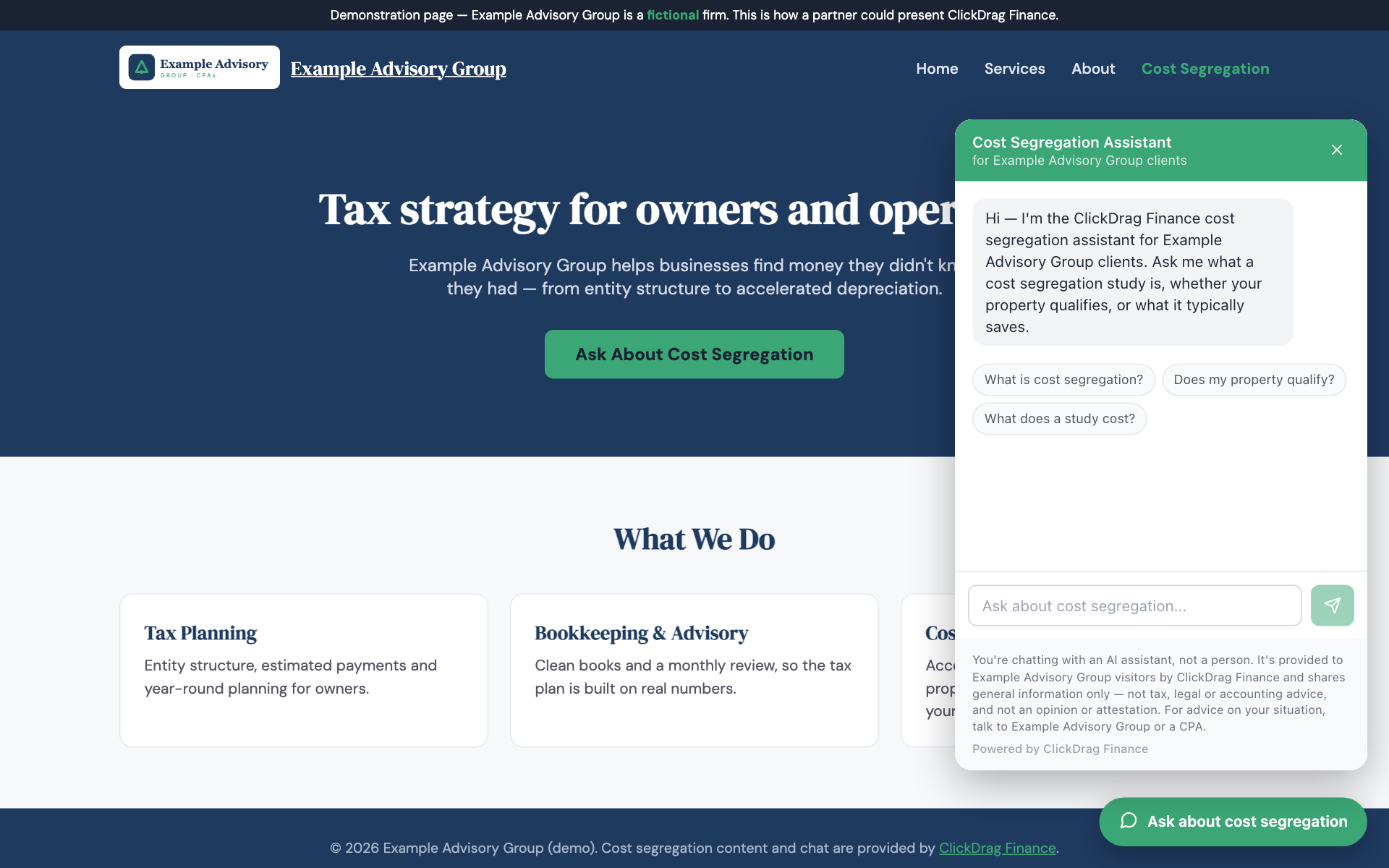
Attributes
| Attribute | Values | Default |
|---|---|---|
| data-partner | Your referral code (required) | — |
| data-mode | bubble | inline | bubble |
| data-target | CSS selector (inline mode only) | — |
| data-height | Inline height in px | 620 |
| data-color | Hex color for the launcher | #f59e0b |
| data-label | Launcher button text | “Ask about cost segregation” |
| data-position | right | left | right |
| data-open | “true” opens the panel on page load, so the chat is above the fold without a click | closed |
Inline example
<div id="cost-seg"></div>
<script src="https://www.clickdragfinance.com/embed/clickdrag-chat.js"
        data-partner="YOUR-CODE" data-mode="inline"
        data-target="#cost-seg" data-height="640" async></script>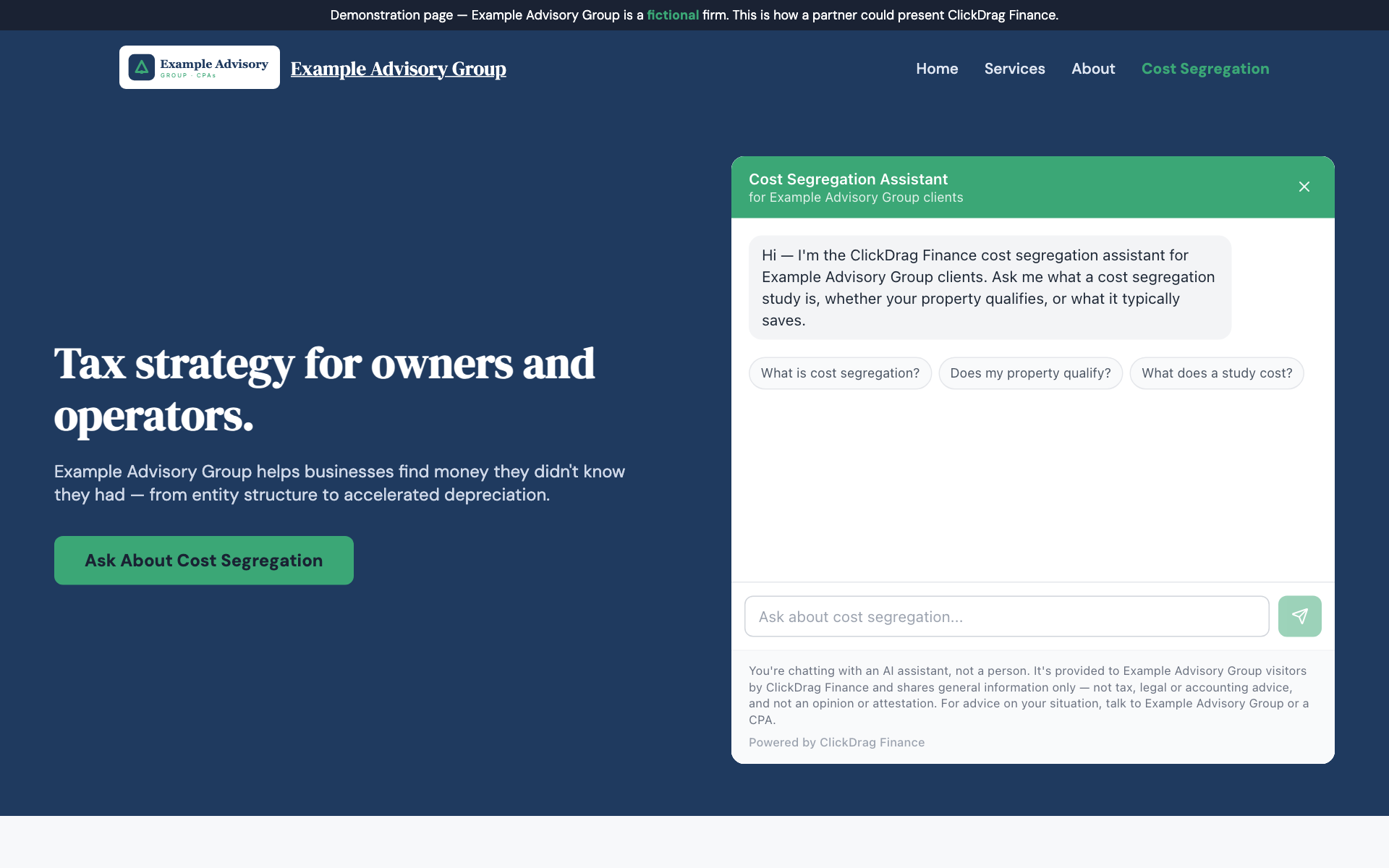
Installing it on your platform
- WordPress
- Appearance › Theme File Editor (paste before </body> in footer.php), or add a “Custom HTML” block, or use a plugin like WPCode.
- Squarespace
- Settings › Advanced › Code Injection › Footer.
- Wix
- Settings › Custom Code.
- Webflow
- Project Settings › Custom Code.
- Plain HTML
- Paste it anywhere before </body>.
What runs on your site
Only the loader — roughly 150 lines of JavaScript that renders a launcher button (or an inline container) and injects an iframe from clickdragfinance.com. The chat itself runs entirely inside that iframe, on our origin. Your site never executes our chat code and never sees a transcript.
Live demos
- /integrations/demo/example-advisory.html — bubble mode
- /integrations/demo/example-advisory-inline.html — inline mode
How do we know a lead came from you?
- A visitor reaches your co-branded page or your embedded widget carrying your referral code.
- We store that code first-party in a
cd_attributioncookie for 90 days, on a first-touch-wins basis — the first partner code a visitor carries is the one that gets credit, even if they browse elsewhere on our site afterward. - The code travels with every chat message and is saved on the chat session and on any lead, estimate, or contact form the visitor submits.
- When we notify our team of a new lead, the email shows “Referral partner: <your firm name>” so nothing falls through the cracks.
What does the assistant say — and not say?
The assistant explains what cost segregation is, asks qualifying questions about the property, quotes our study pricing — a $500 AI report to start, and full engineering studies typically $4,000–$14,000, delivered in days — and hands the conversation to our team when a visitor is ready to move forward.
It never gives tax advice, never states a current-year bonus depreciation rate from memory, and never promises a specific dollar savings. Every conversation carries a persistent notice that it is an AI assistant, not a person, and that its answers are general information, not tax advice. It is branded “Powered by ClickDrag Finance” throughout.
Frequently Asked Questions
Do I need a developer to set this up?
For Option 1 (the co-branded link), no — you just add a link on your own site, the same as any other nav item or button. For Option 2 (the chat widget), you need someone who can paste one line of HTML into your site — a WordPress admin, a Squarespace/Wix/Webflow editor, or a developer. No code needs to be written, only pasted.
What do you need from us to set up a partnership?
Your firm name, website, a logo file, your brand colors, the nav links you want shown on your co-branded page, and a contact phone or email. Turnaround is one business day from the time we have all of that.
What does it cost?
The chat is free for early partners. Pricing for the partnership itself will be set later based on measured usage — there is no cost to add the link or the widget today.
What data do you collect?
The conversation transcript, the visitor’s page URL, a hashed IP address, and any contact details the visitor volunteers (name, email, phone). All of it is retained by ClickDrag Finance, not by your site — the widget only ever loads an iframe from our origin.
Can I change the colors or the wording?
Option 1 is fully co-branded — your header, logo, colors, and fonts. Option 2 supports data-color and data-label attributes on the script tag to match the launcher button to your site, though the panel inside the iframe stays ClickDrag-branded.
Ready to become a partner?
We’ll get you your slug, your referral code, and your co-branded page within one business day.